Still can not edit PDF files freely for the PDF editor is too expensive? Hope to extract text, image, form etc from PDF files? Want to convert PDF files to Doc Word, but do not know which to choose?
Never worried about it again. Doremisoft PDF to Doc. Converter surely supports convert PDF files to Doc, create editable DOC/DOCM/RTF files from PDF and make it easily to re-use PDF content in applications like Microsoft Word, Excel, OpenOffice, and WordPerfect etc on Windows 7, vista, xp, 2000.
PDF to Word Doc Converter is a great document conversion tool to convert Adobe PDF file to Microsoft Word Doc file without Microsoft Word or Adobe Acrobat installed! it supports Batch conversion and Partial conversion.
PDF to Doc software can extract text from PDF file to Word Doc file and preserve the quality, easy to use and fast speed.


Guide: Step by step convert PDF files to Word Doc easily.
Step1: Download PDF to Doc Converter on your PC.
Step2: Add PDF files and set output as .Docx and save
Click "Add Files" to import PDF documents into the program. Then, customize the output the page range. Also, you can personalize the output folder to save the generated word document.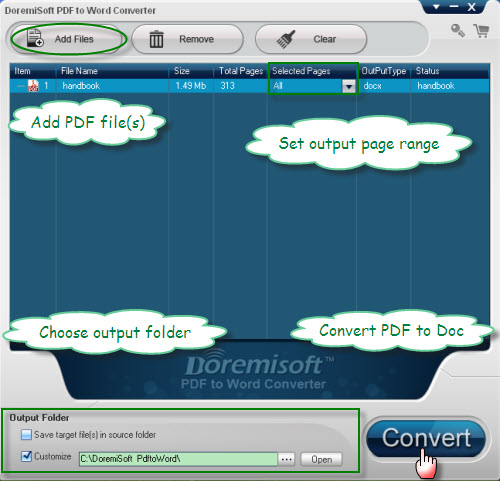
Step3: Hit "Convert" to convert PDF to .Docx Word.
Tip: Currently, the output format is .docx by default. However, you can get Doc files after opening the Docx document with MS Word program and saving Docx as Doc.